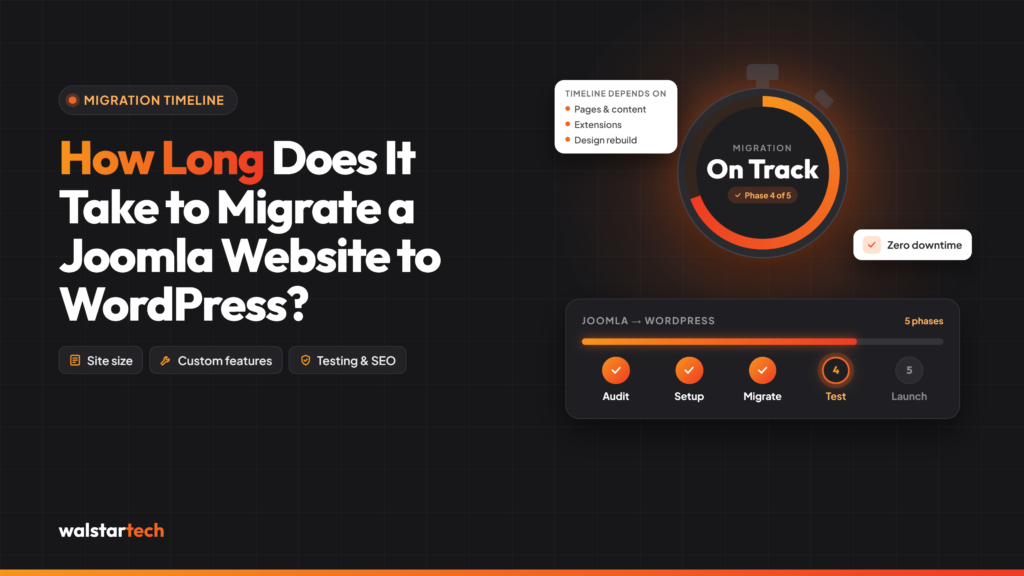
For businesses planning to upgrade their websites, one of the most common questions is: How long does it take to migrate a Joomla website to WordPress?
The answer depends on the website’s size, content volume, custom functionality, design requirements, and SEO complexity.
A small Joomla website may take 2–5 business days to migrate, while a medium-sized business website may require 1–3 weeks. Large enterprise websites with custom integrations, ecommerce functionality, or extensive content can take 4–8 weeks or longer.
These are general planning estimates, not guaranteed completion times.
A professional Joomla to WordPress migration service helps businesses plan the transition, protect important website information, and reduce unnecessary technical delays.
For US businesses, understanding the migration timeline makes it easier to coordinate website updates, marketing campaigns, and ongoing business operations.
What Is the Average Joomla to WordPress Migration Time?
The time required to migrate a Joomla website to WordPress depends on how much content and functionality must be transferred or rebuilt.
Typical planning estimates include:
- Small business website: 2–5 business days for a basic website with limited pages and standard functionality.
- Medium-sized business website: 1–3 weeks for websites with more content, custom layouts, and multiple integrations.
- Large business website: 3–6 weeks for websites with extensive content, custom features, or complex navigation.
- Enterprise or ecommerce website: 4–8 weeks or longer for complex databases, ecommerce systems, and advanced integrations.
The migration timeline should include preparation, development, content transfer, SEO configuration, testing, and launch.
The actual schedule may change depending on technical issues discovered during the process.
1. Website Size and Number of Pages
One of the biggest factors affecting Joomla to WordPress migration time is the size of the existing website.
A website with 15 pages generally requires less migration work than a website containing hundreds of service pages, blog articles, and landing pages.
Larger websites often require additional time for:
- Content inventory and organization
- Page and article migration
- Image and media transfers
- Navigation menu configuration
- Internal link verification
- Content formatting
- Quality assurance testing
For example, a local US service business with a basic informational website may complete migration relatively quickly.
However, a national business website with multiple service categories, locations, and extensive content may require a more detailed migration process.
The more content and structural complexity a website has, the more time may be required to complete and verify its migration.
2. Initial Website Audit and Migration Planning
A successful website migration begins with understanding the existing Joomla environment.
Before transferring content, developers should review the website structure, extensions, databases, SEO configurations, and hosting requirements.
A detailed migration audit helps identify potential technical challenges early.
Important audit activities include:
- Reviewing existing Joomla versions
- Identifying installed extensions
- Checking website database structure
- Analyzing current URL patterns
- Reviewing website functionality
- Evaluating hosting requirements
- Identifying custom-coded features
- Preparing a migration checklist
For smaller websites, the initial assessment may take a few hours. Larger websites may require several days of technical evaluation.
Proper planning can help prevent avoidable complications during development and launch.
3. Website Backup and WordPress Setup
Before migrating Joomla to WordPress, businesses should create a complete backup of their existing website.
This includes website files, databases, media assets, and important configuration information.
A verified backup provides a recovery option if problems occur during migration.
Once the backup is complete, developers can prepare the WordPress environment.
This stage may include:
- Installing WordPress
- Configuring hosting settings
- Creating a staging website
- Installing necessary plugins
- Configuring website security
- Setting up the database
- Preparing the website theme
- Reviewing server compatibility
For a straightforward website, this process may take several hours to a day.
Websites with specialized hosting, security requirements, or complex configurations may need additional preparation.
4. Content and Media Migration
Transferring content is one of the most important stages of a Joomla to WordPress migration.
Business websites often contain valuable pages, blog posts, images, downloadable files, and other resources.
These assets must be transferred accurately and organized within the WordPress content management system.
The process can include:
- Migrating website pages
- Transferring Joomla articles
- Moving images and media files
- Recreating content categories
- Configuring navigation menus
- Preserving important content relationships
- Updating internal links
- Reviewing page formatting
Automated migration tools may help transfer standard content more efficiently.
However, websites using custom Joomla fields, extensions, or unusual content structures may require manual adjustments.
Content migration should focus on accuracy and completeness rather than simply transferring information as quickly as possible.
5. Website Design and Theme Customization
Joomla and WordPress use different theme and template systems.
Therefore, an existing Joomla design cannot always be transferred directly into WordPress.
Businesses may choose to recreate their current design or use the migration as an opportunity to improve their website’s appearance and usability.
Design-related work may include:
- Selecting a WordPress theme
- Recreating existing page layouts
- Customizing fonts and colors
- Updating website navigation
- Improving mobile responsiveness
- Creating landing page templates
- Optimizing images
- Adding conversion-focused elements
A basic WordPress theme setup may take one or two days, while a fully customized website design may require several weeks.
For US businesses planning a complete website redesign, design requirements can become one of the largest factors affecting the migration timeline.
6. SEO Migration and URL Redirect Configuration
SEO preservation is an essential part of the migration process.
Businesses that already receive organic traffic from Google should carefully manage changes to website URLs, metadata, and internal linking.
Poorly implemented migration can result in broken links, indexing problems, and organic traffic fluctuations.
Important SEO migration activities include:
- Reviewing existing indexed pages
- Mapping Joomla URLs to WordPress URLs
- Implementing 301 redirects
- Transferring SEO titles and descriptions
- Preserving important page headings
- Updating internal links
- Configuring XML sitemaps
- Reviewing canonical tags
- Checking robots.txt settings
- Monitoring Google Search Console
For smaller websites, SEO migration configuration may take one or two days.
Larger websites with hundreds of indexed URLs may require considerably more time for redirect mapping and verification.
A properly planned Joomla to WordPress SEO migration helps reduce unnecessary search visibility disruption, although rankings cannot be guaranteed.
7. Plugin Migration and Custom Functionality
Joomla extensions and WordPress plugins operate differently.
As a result, businesses may need to replace or rebuild some website features during migration.
The time required depends on the complexity of the existing functionality.
Common features include:
- Contact forms
- Appointment booking systems
- Ecommerce functionality
- Customer login portals
- Membership systems
- Payment gateways
- CRM integrations
- Marketing automation
- Custom databases
- Third-party applications
For example, replacing a standard contact form may require only a few hours.
However, rebuilding a custom customer portal or integrating an ecommerce system can take several days or weeks.
Businesses should identify all essential functionality during the initial website audit to avoid unexpected delays.
8. Website Testing and Quality Assurance
Testing is necessary before launching the migrated WordPress website.
Even if content and design appear correct, technical issues can affect user experience and business operations.
A complete quality assurance process helps identify problems before the website becomes publicly accessible.
Important testing activities include:
- Checking website pages and layouts
- Testing mobile responsiveness
- Reviewing navigation menus
- Verifying contact forms
- Checking internal links
- Testing 301 redirects
- Reviewing page loading performance
- Confirming analytics tracking
- Checking website security
- Testing ecommerce or custom functionality
For smaller websites, testing may take one or two days.
Larger websites with complex integrations may require additional testing cycles and client approvals.
Thorough testing helps ensure the migrated WordPress website is ready for visitors, customers, and search engines.
9. Website Launch and Post-Migration Monitoring
Once the WordPress website has been developed and tested, the next stage is the website launch.
This involves moving the completed website from its staging environment to the live domain.
Launch activities may include:
- Final website backup
- Domain and hosting configuration
- Database synchronization
- Redirect verification
- SSL certificate checks
- Analytics validation
- Search Console configuration
- XML sitemap submission
- Final website functionality testing
The technical launch may take a few hours, depending on the hosting environment and project requirements.
However, migration work should not stop immediately after the website goes live.
Businesses should monitor website performance, search indexing, traffic, and functionality during the following days and weeks.
Post-launch monitoring helps identify issues that may not have appeared during staging tests.
10. How WalstarTech Helps Businesses Simplify Joomla to WordPress Migration
Choosing an experienced migration partner can help businesses manage the technical requirements of moving from Joomla to WordPress.
A professional migration team can coordinate the different stages of the project, from initial planning to website launch and testing.
WalstarTech offers professional Joomla to WordPress migration services for businesses looking to transition to a more flexible website platform.
Its migration services address important areas such as:
- Website assessment and migration planning
- Joomla content and media transfer
- WordPress installation and configuration
- Website design and customization
- SEO-related migration requirements
- URL redirects and metadata
- Website functionality and integrations
- Quality assurance testing
- Website launch assistance
- Post-migration technical support
For US businesses, working with a professional service provider can reduce the burden of managing complex technical tasks internally.
WalstarTech can help businesses evaluate their website requirements and develop a migration approach based on the size and complexity of the project.
A structured migration process can help minimize avoidable delays while maintaining attention to website quality, functionality, and SEO.
Why Joomla to WordPress Migration Planning Matters for US Businesses
Website migration can affect more than website design and content management.
For many US businesses, their websites support lead generation, customer communication, ecommerce transactions, and ongoing digital marketing campaigns.
Unexpected downtime or technical problems can disrupt these activities.
A well-planned migration strategy helps businesses coordinate:
- Website development schedules
- Marketing campaign timelines
- Content updates
- SEO requirements
- Customer enquiries
- Website functionality
- Internal team responsibilities
- Launch approvals
For example, an ecommerce business may prefer to schedule migration activities during a period of lower website traffic.
Similarly, a service-based business running Google Ads campaigns should ensure important landing pages and conversion tracking remain functional after migration.
Planning the migration around business priorities can help reduce operational disruption.
Final Thoughts
The time required to migrate a Joomla website to WordPress depends on several factors, including website size, content volume, design requirements, SEO complexity, and custom functionality.
While smaller websites may be migrated within a few business days, larger business websites can require several weeks of planning, development, and testing.
The goal of a successful Joomla to WordPress migration is not simply to complete the process quickly. It is to create a reliable WordPress website while protecting valuable content, functionality, and SEO elements.
For US businesses considering a CMS upgrade, working with a professional migration partner can help make the transition more organized and manageable.
WalstarTech provides professional Joomla to WordPress migration solutions designed to support businesses throughout the transition.
Ready to migrate your Joomla website? Explore WalstarTech’s migration services and discuss a timeline based on your website’s specific requirements.
Frequently Asked Questions (FAQs)
1. How long does it take to migrate a Joomla website to WordPress?
A small Joomla website may take 2–5 business days, while medium-sized websites may require 1–3 weeks. Complex enterprise websites can take 4–8 weeks or longer, depending on their requirements.
2. Can Joomla to WordPress migration be completed in one day?
A very simple website may be migrated within one day, particularly when using automated tools. However, proper testing, SEO configuration, and functionality verification may require additional time.
3. Will my website experience downtime during migration?
Downtime can often be minimized by developing and testing the WordPress website in a staging environment before launch. The actual interruption depends on the hosting and deployment process.
4. Does Joomla to WordPress migration affect SEO rankings?
Migration can affect rankings if URLs, redirects, content, or technical SEO elements are not handled correctly. Proper planning and monitoring help reduce the risk of unnecessary ranking losses.
5. Can WalstarTech help migrate my Joomla website to WordPress?
Yes. WalstarTech offers professional Joomla to WordPress migration services covering content transfer, WordPress configuration, SEO considerations, website testing, and technical support.
Migrate Your Joomla Website With WalstarTech
Planning to move your business website from Joomla to WordPress but unsure how long the process will take?
WalstarTech provides professional Joomla to WordPress migration services for US businesses seeking a structured, secure, and SEO-conscious website transition.
Whether you manage a small business website, a content-heavy platform, or a complex business application, WalstarTech can help assess your website and plan the migration according to its requirements.
Contact WalstarTech today to discuss your Joomla to WordPress migration project and get started with a professional migration plan.