Migrating a website from Joomla to WordPress involves more than changing your content management system (CMS). It requires transferring valuable website content, preserving images, maintaining page structures, and protecting important SEO elements.
For businesses across the United States, website content plays an essential role in attracting customers, generating leads, and maintaining search engine visibility.
A poorly planned migration can result in missing articles, broken image links, formatting issues, and unexpected changes to website performance.
A professional Joomla to WordPress migration service helps businesses manage these challenges while moving their website content to a more flexible WordPress environment.
Whether you operate a small business website, a corporate platform, or a content-heavy website, understanding how to transfer Joomla articles, pages, and images to WordPress can help you prepare for a smoother transition.
This guide explains the essential steps, common challenges, and best practices for transferring website content without unnecessarily disrupting your existing online presence.
What Is Joomla to WordPress Content Migration?
Joomla to WordPress content migration is the process of transferring website information from Joomla’s content management system to WordPress.
This typically includes:
- Joomla articles and blog posts
- Website pages and service content
- Images and media files
- Content categories
- Navigation menus
- Internal links
- SEO titles and meta descriptions
- Author information
- Publishing dates
- Important website URLs
Although Joomla and WordPress both support content management, they organize information differently.
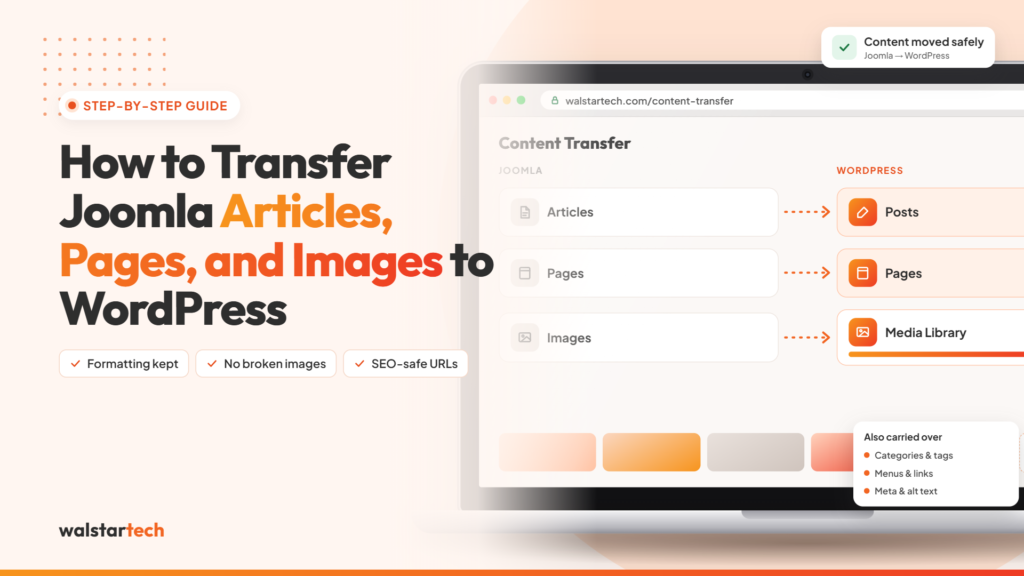
For example, Joomla primarily manages website content through articles, categories, and menu items. WordPress organizes content through posts, pages, categories, tags, and other content types.
Because of these differences, businesses need to map existing Joomla content to the appropriate WordPress structure.
The objective is to preserve valuable website information while making it accessible and manageable within WordPress.
1. Audit Your Existing Joomla Website Before Migration
A successful Joomla to WordPress migration begins with a complete website content audit.
Before transferring articles, pages, or images, businesses should understand what content exists and how it is organized.
This helps identify outdated information, duplicate pages, missing images, and content that requires special handling.
Important audit activities include:
- Reviewing all Joomla articles
- Identifying important service pages
- Checking website categories
- Listing existing media files
- Reviewing navigation menus
- Identifying high-performing SEO pages
- Checking internal and external links
- Reviewing website URLs
- Identifying custom content fields
- Documenting important website functionality
For example, a US business with hundreds of published articles may want to identify which pages generate organic traffic before starting migration.
These pages should receive particular attention during content transfer and SEO verification.
A detailed content audit reduces the risk of overlooking important website information during migration.
2. Create a Complete Backup of Your Joomla Website
Before making any changes, create a complete backup of your Joomla website.
A backup protects your existing website information and provides a recovery option if unexpected technical issues occur.
Your backup should include:
- Joomla website files
- Website database
- Articles and page content
- Images and media folders
- Templates and extensions
- Configuration files
- Important website settings
Businesses can create backups through hosting control panels, server-level backup tools, or compatible Joomla backup extensions.
After creating the backup, verify that the files are complete and can be restored successfully.
It is also advisable to retain the existing Joomla website while developing the new WordPress version in a staging environment.
This allows developers to test the migration without immediately affecting the live website.
Never begin a major website migration without a verified backup and recovery plan.
3. Set Up WordPress for Content Migration
Once the Joomla website has been backed up, the next step is to prepare the WordPress environment.
WordPress should ideally be installed on a staging website or separate development environment.
This allows the migration process to take place without disrupting the existing Joomla website.
The initial WordPress setup may include:
- Installing WordPress
- Configuring the database
- Selecting a suitable theme
- Setting up permalink structures
- Installing necessary plugins
- Configuring user roles
- Preparing content categories
- Setting up basic security
- Reviewing hosting compatibility
Businesses should also determine how Joomla content will be organized within WordPress.
For example, Joomla articles used for blogging may be transferred into WordPress posts, while service information may be recreated as WordPress pages.
The correct approach depends on how the existing Joomla website is structured.
A professional migration provider can help establish the appropriate WordPress environment before content transfer begins.
4. Transfer Joomla Articles to WordPress Posts
Transferring Joomla articles is one of the most important stages of the migration process.
Joomla articles often contain valuable information such as business updates, educational blogs, product descriptions, and industry resources.
WordPress uses posts for blog-style content, making them a common destination for Joomla articles.
Businesses can transfer Joomla articles through compatible migration tools or manual content migration.
A typical article migration process involves:
- Connecting the migration tool to the Joomla database
- Importing Joomla article content
- Mapping Joomla categories to WordPress categories
- Preserving article titles
- Transferring publication dates where supported
- Mapping authors where appropriate
- Reviewing content formatting
- Checking embedded media
- Verifying internal links
One commonly used option is the FG Joomla to WordPress plugin, which can assist with importing Joomla content. Available features and supported Joomla versions should be checked before use.
After importing articles, businesses should review the content carefully.
A successful article migration should preserve the meaning, structure, and accessibility of existing website content.
5. Migrate Joomla Pages to WordPress Pages
Joomla and WordPress handle website pages differently.
In Joomla, an article may be displayed as a standalone page through a menu item. WordPress provides a dedicated page content type for static website information.
During migration, businesses should determine which Joomla articles should become WordPress posts and which should become pages.
Common business pages include:
- Home
- About Us
- Services
- Contact Us
- Privacy Policy
- Terms and Conditions
- Industry-specific service pages
- Location landing pages
For example, a US digital marketing company may want its service pages to remain separate from its blog articles.
These pages should be recreated or mapped appropriately within WordPress.
Important considerations include:
- Preserving page titles
- Maintaining heading structures
- Recreating page layouts
- Updating navigation menus
- Checking contact forms
- Reviewing internal links
- Preserving relevant SEO information
Some migration tools may import Joomla articles as WordPress posts by default. In these cases, additional configuration or conversion may be required to create WordPress pages.
Proper content mapping helps maintain a logical website structure and improves long-term content management.
6. Transfer Joomla Images and Media Files to WordPress
Images are essential components of business websites.
They support website design, product presentation, blog content, and user engagement.
During a Joomla to WordPress migration, images must be transferred carefully to avoid broken links and missing media.
Joomla commonly stores uploaded images in its website directories, while WordPress typically organizes uploaded media through its uploads directory and Media Library.
The image migration process may include:
- Identifying existing Joomla image directories
- Transferring image files
- Importing media into WordPress
- Updating image URLs
- Checking featured images
- Reviewing image alt text
- Verifying image dimensions
- Testing image display across pages
- Checking downloadable media files
For example, if a Joomla article references an image stored in an existing Joomla directory, the image URL may need to be updated after migration.
Businesses should also review image optimization opportunities to support faster website loading.
However, image compression should not unnecessarily reduce visual quality.
A complete media migration ensures that website images remain accessible and correctly displayed after the platform change.
7. Preserve Joomla SEO Metadata and URL Structures
SEO preservation is one of the most important considerations when transferring website content.
Many businesses already have Joomla pages indexed by Google and other search engines.
Changing URLs without proper planning can lead to broken links, indexing problems, and organic traffic fluctuations.
A professional Joomla to WordPress SEO migration should address:
- Existing page URLs
- SEO titles
- Meta descriptions
- Heading structures
- Image alt attributes
- Canonical URLs
- Internal links
- XML sitemaps
- Redirect mapping
- Search engine indexing settings
Where possible, businesses should preserve important existing URLs.
If URLs must change, appropriate 301 redirects should be implemented to direct visitors and search engines to the corresponding WordPress pages.
For example:
Old Joomla URL:
example.com/index.php/services/web-development
New WordPress URL:
example.com/services/web-development/
A 301 redirect can help connect the old URL to the new destination.
After migration, businesses should verify redirects and monitor indexing through Google Search Console.
Preserving SEO elements helps reduce unnecessary disruption, although search rankings cannot be guaranteed during migration.
8. Fix Internal Links, Categories, and Navigation Menus
Once articles, pages, and images have been transferred, businesses need to review the website’s internal structure.
Joomla and WordPress organize categories, menus, and page relationships differently.
As a result, some internal links may still point to outdated Joomla URLs after migration.
Important post-transfer activities include:
- Updating internal links
- Rebuilding navigation menus
- Mapping content categories
- Reviewing website breadcrumbs
- Checking sidebar links
- Updating footer navigation
- Verifying image links
- Fixing broken URLs
- Reviewing category archive pages
- Testing important landing pages
For example, a blog article linking to an old Joomla service page should be updated to reference the correct WordPress destination.
Maintaining a clear website structure helps users navigate content and supports search engine crawling.
Businesses should also avoid creating unnecessary duplicate categories or archive pages during migration.
Accurate internal linking and navigation help preserve usability and support effective website organization.
9. Test Migrated Content Before Launching WordPress
Testing is essential after transferring Joomla articles, pages, and images to WordPress.
Even when migration tools report a successful import, individual content elements may still require adjustments.
Businesses should review the migrated website in a staging environment before launch.
Important testing activities include:
- Comparing Joomla and WordPress article counts
- Checking important website pages
- Reviewing blog formatting
- Verifying images and media
- Testing internal links
- Checking navigation menus
- Reviewing mobile responsiveness
- Validating SEO metadata
- Testing redirects
- Confirming website functionality
For large websites, automated checks can help identify broken links, missing media, and redirect errors.
However, manual review is still important for verifying content accuracy and page layouts.
After the website goes live, businesses should monitor Google Search Console, analytics data, and website functionality.
A migration should be considered complete only after important content and functionality have been verified.
10. Choose WalstarTech for Professional Joomla to WordPress Content Migration
Transferring Joomla articles, pages, and images to WordPress can become technically challenging, especially for businesses with large websites, custom extensions, or complex content structures.
A professional migration service helps businesses coordinate content transfer, WordPress setup, SEO considerations, and technical testing.
WalstarTech provides Joomla to WordPress migration services for businesses looking to transition to a flexible and manageable website platform.
WalstarTech’s migration solutions address important requirements such as:
- Joomla website assessment
- Content migration planning
- Article and page transfers
- Image and media migration
- WordPress installation
- Website design customization
- SEO metadata and URL redirects
- Website functionality configuration
- Migration testing
- Post-migration technical assistance
For US businesses, professional migration support can reduce the internal workload associated with transferring website content and rebuilding important functionality.
Whether you manage a small company website or a content-heavy business platform, WalstarTech can help evaluate your migration requirements and plan an appropriate transition.
The objective is to move valuable website content into WordPress while maintaining attention to functionality, accessibility, and SEO.
Why Proper Joomla Content Migration Matters for US Businesses
Website content supports customer communication, search visibility, lead generation, and brand credibility.
For US businesses investing in digital marketing, losing important website information during migration can create unnecessary operational and marketing challenges.
A well-planned content migration helps businesses:
- Preserve valuable website information
- Maintain important service pages
- Protect existing content investments
- Reduce broken links
- Maintain website navigation
- Support SEO continuity
- Improve content management
- Prepare for future website expansion
For example, a local business receiving organic enquiries through service pages should ensure those pages remain accessible after migration.
Similarly, a company with an established blog should verify that important articles, images, and internal links transfer correctly.
Proper Joomla to WordPress content migration is not simply a technical process. It is an important part of protecting a business’s existing digital assets.
Final Thoughts
Transferring Joomla articles, pages, and images to WordPress requires careful planning, accurate content mapping, secure data handling, and detailed testing.
From auditing the existing Joomla website to migrating content, updating URLs, transferring images, and verifying functionality, every stage contributes to a successful website transition.
A professional Joomla to WordPress migration service can help businesses reduce technical complications and preserve valuable website content.
For US businesses looking to simplify content management and improve website flexibility, WordPress can provide a practical platform for future digital growth.
However, the migration should be completed with careful attention to existing SEO performance, website functionality, and user experience.
WalstarTech provides professional migration solutions designed to help businesses move their Joomla websites to WordPress through a structured process.
Ready to transfer your Joomla website content to WordPress? Explore WalstarTech’s professional migration services and plan your next website upgrade.
Frequently Asked Questions (FAQs)
1. Can I transfer Joomla articles directly to WordPress?
Yes. Joomla articles can be transferred using compatible migration plugins, database migration methods, or manual content transfers. The approach depends on the Joomla version and website structure.
2. Will my Joomla images automatically transfer to WordPress?
Some migration tools support image transfers, but results depend on tool capabilities and website configuration. Images should be verified after migration to ensure files and URLs work correctly.
3. Can I preserve my existing Joomla website URLs?
Many URLs can be preserved or mapped to new WordPress URLs. When URLs change, 301 redirects should be configured to help visitors and search engines reach the correct pages.
4. Does migrating Joomla content to WordPress affect SEO?
Migration can affect SEO if content, metadata, URLs, or internal links are not transferred correctly. Careful planning and post-launch monitoring help reduce unnecessary disruptions.
5. Does WalstarTech provide Joomla to WordPress content migration services?
Yes. WalstarTech offers Joomla to WordPress migration services addressing content transfer, media migration, WordPress configuration, SEO considerations, and technical support.
Migrate Your Joomla Articles, Pages, and Images With WalstarTech
Planning to move your Joomla website to WordPress but concerned about losing important content, images, or SEO elements?
WalstarTech provides professional Joomla to WordPress migration services for US businesses seeking a structured and reliable website transition.
Whether you need to transfer blog articles, recreate business pages, migrate media files, or configure SEO redirects, WalstarTech can help assess your requirements and develop a suitable migration plan.
Contact WalstarTech today to explore professional Joomla to WordPress migration services and take the next step toward a more flexible business website.